Welcome to SBN Store
Register and Publish your Software for Free
.png)
BEBS SMART
Complete School Management System with role-based access for Admin, Teachers, Staff, Students, and Parents. 👥 User Roles Role Access 👑 Admin Full system control 👨🏫 Teacher Class management, attendance, homework, marks 👨💼 Staff Limited teacher access 🎓 Student View attendance, homework, results, fees 👪 Parent Monitor child's progress ⚡ Key Features 1. 🔐 Login System Secure login with role-based access Remember me option 2. 👥 Student Management Add/Edit/Delete students Assign classes (Nursery - 10) Search students 3. 👨🏫 Staff Management Add/Edit/Delete teachers Class teacher designation Staff directory 4. 📊 Attendance ✅ Mark daily attendance 📅 Calendar view for students 📈 Attendance percentage 5. 📝 Homework ✏️ Post homework with files 📥 Download attachments ✏️ Edit/Delete homework 6. 📈 Results 📊 Enter marks 🏆 Grade calculation 📄 Student result view 7. 📅 Exam Management 📆 Create exam schedules 📋 View exam routine 8. 💬 Chat System 💬 Public chat (Students ↔️ Teachers) 🔒 Staff-only chat 🖼️ Image support 9. 💰 Fee Management 💵 Record fee payments 📊 View fee status 10. 📢 Notice Board 📰 Post announcements 👀 View notices 11. 📋 Complaint System 📝 Submit complaints ✅ Admin resolution 12. 👤 Profile ✏️ Update personal details 🖼️ Upload profile picture
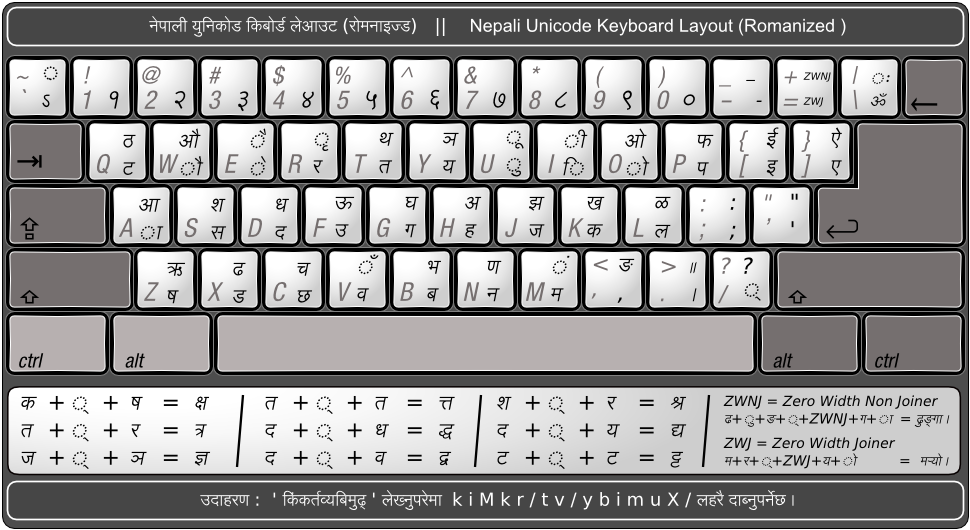
Unicode Romanized Fonts Download
Nepali unicode provides support for the given language. First of all, you have to Download and Run the Program in your computer. Then, you have to do some settings in your computer to use Nepali Unicode Romanised. Nepali Unicode Romanised can be downloaded from the main website.
SBN Sewa Mobile app ,
New update 2082-11-23 new update App is Availabe , Go and Download
SBN Sewa Desktop Verson
SBN Sewa: Desktop Version :- The SBN Sewa Desktop Version is a comprehensive, high-performance application designed for power users who require a stable, large-screen interface for managing digital transactions, service requests, and administrative tasks. Built to bridge the gap between mobility and professional-grade management, the desktop version offers enhanced security and advanced multitasking capabilities. Feature,Minimum Requirement Operating System,Windows 10/11 (64-bit) or macOS 11.0+ Processor,Dual-core 2.0 GHz or higher RAM,4 GB (8 GB Recommended) Storage,500 MB of available space Internet,Stable Broadband Connection
Microsoft Office 2007 Complete Package
Microsoft Office 2007 is a productivity suite developed by Microsoft, offering a comprehensive set of tools for creating, managing, and sharing documents efficiently. It introduced the modern “Ribbon” interface, making it easier to access features and tools. The Complete Package includes the most popular Office applications: Microsoft Word 2007 – For creating and editing professional documents. Microsoft Excel 2007 – For managing data, performing calculations, and creating charts. Microsoft PowerPoint 2007 – For designing engaging presentations. Microsoft Access 2007 – For managing databases. Microsoft Outlook 2007 – For email, calendar, and contact management. Microsoft Publisher 2007 – For designing brochures, newsletters, and marketing materials. Microsoft OneNote 2007 – For note-taking and organizing ideas. Key Features: User-friendly Ribbon interface for faster access to tools Enhanced graphics and charting capabilities Improved document themes and SmartArt visuals Seamless integration with Microsoft services Compatibility with older Office file formats Secure document management and collaboration Ideal For: Students, teachers, professionals, and businesses who need reliable office tools for daily productivity tasks.
.png)
S.B Niketan School App
Download our School App and get Enjoy !

Adobe Photoshop CS6 is one of the most advanced and widely used photo editing and graphic design tools in the world.
Adobe Photoshop CS6
Sathi Mobile App
Downlaod the Sathi Mobile App